
|
ITK Function Reference
(V10000.1.0.60_20160308.00) |
|
ITK Function Reference
(V10000.1.0.60_20160308.00) |
Modules | |
| AE Errors | |
| AE Types | |
| Dataset | |
| DatasetType | |
| Named Revision Anchor | |
| NXSM | |
| Revision Anchor | |
| Shell Utilities | |
| Tool | |
| Volume Mananagement Errors | |
Typedefs | |
| typedef void(* | AE_ToolHandlerFp )(tag_t) |
Functions | |
| AE_API const char * | AE_ask_known_actions (int action) |
| AE_API int | AE_ask_known_actions_array_size (void) |
| AE_API int | AE_exit_module (void) |
| AE_API int | AE_register_tool (const char *aToolName, int messageCode, AE_ToolHandlerFp handler) |
Variables | |
| C | |
Application Encapsulation serves four primary purposes:
It allows the system to present a direct means of dealing with objects of interest to the end user. An end user may be a design engineer, in which case the objects of interest for the task at hand may include drawings, CAD models, and analysis data. Dealing directly with these objects is preferable to learning the details of the computer environment and to preparing the computer environment needed to access objects in the system.
It provides the system administrator with means of controlling access, managing storage, and specifying applications that may be used to generate different types of data at the site in consideration.
It provides the system integrator with a set of functions that enable data sharing and making apparently unrelated applications part of a consistent whole. This set of functions will be used by applications designed with Teamcenter Engineering in mind and will also assist an integrator in writing application encapsulation shells for existing applications.
This module maintains four classes of objects.
Datasets
A dataset will contain information such as the creating application in addition to all of the standard set of information about Workspace objects. It will also specify location information and site designated dataset classification information. Site designated dataset classification, which is merely a string of characters to Teamcenter Engineering, allow users to classify a dataset, for example as "Sketch" or "Trip Report", according to their conventions.
The dataset interface should be robust enough for most applications, such that you should probably not need to ever deal directly with revision anchors. To do this, some implicit refreshing and saving of revision anchors takes place that you must be aware of if you do work with revision anchors. In particular, "create", "purge", "delete", "delete_all", and "revise" all load the revision anchor for modify if it has not already been so loaded. Therefore, you should not do it, or you may lose other edits that occur in your session. "Purge", "delete", and "save" will all save the revision anchor.
Dataset Types
Objects of this class contain data that describe the information in datasets. This data includes the set of applications, or Tools, that may be used in creating a dataset of this type.
It is possible to register a DatasetType for specific workspace actions. If the action is registered for a DatasetType, then Teamcenter Engineering invokes the appropriate tool whenever that action is chosen for datasets of that type. If the action is not registered, then the default Teamcenter Engineering behavior occurs and no tool is called.
By default, when a dataset is created the actions "create", "open", "open using", and "print" are registered. These can be unregistered and additional actions can be registered as desired. The default Teamcenter Engineering behavior for actions is as follows:
| create | A new dataset of the specified type is created and inserted in the NewStuffFolder, but no named references are assigned.
|
| open | Open passes the filename of the first named reference that is an ImanFile directly to the tool. If the file is modified, a new dataset revision is created.
|
| open_using | Same as open, except that it opens the selected revision with the selected tool. |
| Teamcenter Engineering attempts to print the contents of any ImanFiles referenced by the dataset. They must be of a printable format for this to work, thus the default action only makes sense with ASCII format. | |
| print_using | This is a print action where the user is expecting to enter some additional criteria on what gets printed or how it gets printed. For example, the user could be presented with a menu of drawings in a particular UGPART or with a list of possible plotters to send it to. The default Teamcenter Engineering action is the same as print. |
| save_as | A copy of the selected dataset is placed in the NewStuffFolder. |
| destroy | Dataset is destroyed if it is not referenced. |
| purge | All old revisions of the dataset are destroyed if they are not referenced. |
| import | There is no difference in behavior since the import action does not currently invoke a tool. |
Tools
A tool Object contains information about an application in your environment. This information includes:
Revision Anchors
A revision anchor is an object that keeps track of a set of revisions of some object. One such class of objects is dataset. The Revision anchor also contains the value for how many revisions to keep.
Use of WSOM and AOM
Since all of the AE objects are application objects, all of the AOM functions can be used with datasets, dataset types, tools, and revision anchors. Therefore, use AOM_save, AOM_delete, AOM_refresh, AOM_load, and AOM_unload as AE classes do not have these functions.
Furthermore, datasets and tools are workspace objects. This means that WSOM_ask_name, WSOM_set_name, WSOM_ask_description, WSOM_set_description, WSOM_find, WSOM_get_info and WSOM_set_info will work with objects of these classes.
Constants and Errors
Several constants have been defined which are useful in your code.
| AE_symbol_size_c | Number of characters allowed in a tool symbol name. |
| AE_io_format_size_c | Number of characters allowed in a tool's input or output format. |
| AE_siteclass_size_c | Number of characters allowed in a tool or dataset site classification. |
| AE_vendor_name_size_c | Number of characters allowed in a tool vendor name. |
| AE_version_size_c | Number of characters allowed in a tool version. |
| AE_reference_size_c | Number of characters allowed in a dataset named reference label. |
| AE_parameter_size_c | Number of characters allowed in a tool input parameter. |
| AE_value_size_c | Number of characters allowed in a tool parameter default value. |
| AE_datasettype_name_size_c | Number of characters allowed in a DatasetType name. |
| AE_datasettype_desc_size_c | Number of characters allowed in a DatasetType description. |
The following constants should be used when specifying the type of a named reference:
All of the AE errors are defined in ae_errors.h. EMH_AE_error_base is defined in emh_const.h.
Data Structure and Processes
All objects in this module are referenced by a tag declared as:
tag_t yourVariableName;
A symbolName must be created for the tool to be invoked properly; it must be a valid path or link name. It is simply the same name as one would type at an operating system prompt to invoke the tool. The nodeName, pathName and fileName indicate the location of the image file on the host system. The date refers to the date that the software was actually installed on the system, as opposed to the date this instance of data was created in POM.
When a dataset is selected in the Teamcenter Engineering workspace and an action is chosen from the menu bar, Teamcenter Engineering will read the dataset's attributes to obtain the tool last used to save it. It will then read the tools data to get the necessary information for starting that tool. It will then start a process with that tool running in it using a command format represented as:
SymbolName tagAsString request
Where:
For example, if the request is to "OPEN" a dataset created through a fully integrated application, the application should be written to accept the command, access data for the object from Teamcenter Engineering, perform the logic appropriate for the action requested, and then update data for Teamcenter Engineering.
Sometimes, you may want to encapsulate applications that were not written to be integrated with Teamcenter Engineering and it is either impossible or too expensive to rewrite them such that they could be. In that case, it is necessary to write a "shell." A shell is a simple application, or tool, that essentially translates between Teamcenter Engineering and another application. Using the example of OPEN dataset again, upon receiving the OPEN command, Teamcenter Engineering would get the tool of the dataset and find out if that tool has a Shell. If it did, then Teamcenter Engineering would start the shell instead. Then the shell would read the dataset information and pass it along to the tool in the format that the tool expects it. This could just mean getting the names of the files that ago with the selected dataset. Once the user has finished with the tool, then shell must reformat any output into something that Teamcenter Engineering will understand. This could be as simple as saving a new revision of a dataset which points to some output files from the tool.
Revisioning
Every dataset refers to a revision anchor. This revision anchor maintains a list of all of the revisions of a specified dataset. It is not normally necessary to work with revision anchors when using the ITK. Most standard functions are available directly through the dataset ITK functions.
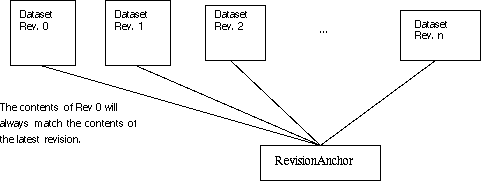
When a dataset is created, a revision anchor is created automatically. It will have the keep limit default set by the system administrator. If an application does not want to provide revisions of datasets, it may simply load, modify, and save the original dataset.
If saving a dataset will cause the number of dataset revisions in the chain to exceed the current revision limit for that dataset, then the system will delete old revisions until the total number equals the keep limit. It will not delete versions that are to be referenced by another Teamcenter Engineering object. For example, if a set of revisions includes revisions 1, 2, 3, and 4 with a keep limit of 4 and revision 1 is referenced explicitly by a folder; then when revision 5 is saved, the system will try to delete revision 1 and fail, then successfully delete revision 2.
Common Return Values
| AE_API const char* AE_ask_known_actions | ( | int | action | ) |
| AE_API int AE_ask_known_actions_array_size | ( | void | ) |
| AE_API int AE_exit_module | ( | void | ) |
This function must be called immediately after all AE activity is complete.
| AE_API int AE_register_tool | ( | const char * | aToolName, |
| int | messageCode, | ||
| AE_ToolHandlerFp | handler | ||
| ) |
Registers a tool for a specified messageCode. The messageCode is a member of AE_action_t and the handler is a pointer to a supplied function that is called whenever a dataset is invoked using the tool and the messageCode.
| aToolName | (I) |
| messageCode | (I) |
| handler | (I) |
| C |